ALT_IMG

Sync Music To Your iPhone/iPod Without iTunes

By default, iTunes is the only media player that you can use to sync your iPhone and iPod Touch with your computer. However, iTunes is only supported in Mac and Windows, which means Linux users with iPhones will have to find an alternative way to sync their iPhones, or at least get their music into the mobile device.Readmore...

ALT_IMG

Nokia unveils Asha 230

Nokia announced Asha 230 Single and Dual Sim Mobilelow-cost budget feature phones at the Mobile World Congress 2014. Asha 230 comes with 2.8-inch QVGA touch screen, 1.3-megapixel rear camera, Bluetooth 3.0 with Slam sharing feature, micro USB, expansion slot that supports cards up to 32GB and packs a 1020 mAh battery. Readmore..

Alt img

Micromax Yureka

Micromax's yet another budget phone Micromax Yu also called as Yureka. YU is running on Cyanogen 11 with excellent hardware configuration equipped with 64 bit snapdragon octa core Processor 1.5GHz, Adreno 405 GPU, 2GB RAM, dual SIM with 4G and 3G support and 16GB internal storage with 32GB External SD card support....Readmore...

ALT_IMG

XOLO ONE - Budget Android Lollipop Mobile

XOLO ONE gets the lollipop update and becoming the first budget mobile with latest Android 5.0 Operating System. XOLO one is seems to be the same configuration of Android one Mobiles, however the latest Android 5.0 Operating System not yet available for Google Android one phones Readmore...

ALT_IMG

Lenovo A6000 Budget 4G Smartphone in India

Lenovo has launched the cheapest 4G smartphone A6000 in India, priced at Rs 6,999. The device was first showcased at the CES 2015 and Lenovo has already brought it to India, making it the most affordable 4G smartphone to have launched in the country so far. Readmore...

ALT_IMG

Nokia X series Android-based smartphones

Nokia has announced its Most awaited Android based Nokia X series smartphones Nokia X, Nokia X+ and Nokia XL. its a nokia first ever andorid smartphone based on Android Open Source Project(AOSP.. Readmore...

Showing posts with label Android News. Show all posts
Thursday, 8 March 2012

Android Market checks out, Google Play moves in

0 comments


Android Market checks out, Google Play moves in


Google on Tuesday introduced a new online store called Google Play, offering consumers a one-stop marketplace for music, movies, books, applications and other digital media content.

The store will create a unified digital entertainment destination that combines the company’s app store, as well as other stores including Google Music and the Google eBookstore, Xinhua reported.


“Google Play is entirely cloud-based so all your music, movies, books and apps are stored online, always available to you, and you never have to worry about losing them or moving them again," Jamie Rosenberg, director, digital content at Google, wrote in a post on the firm’s official blog.


With Google Play, a user can store up to 20,000 songs for free and buy millions of new tracks, said Rosenberg. The marketplace will also offer over 450,000 Android apps and games.


source : hindustantimes.com

Continue reading →
Sunday, 22 January 2012

Polaroid SC1630-World's first Android HD smart camera

0 comments

 Polaroid SC1630-World's first Android HD smart camera

Polaroid_SC1630_Photo


A Digital Camera with Android OS in it? Yes, it is Polaroid SC1630, a latest digicam by Polaroid with 3x optical zoom, it a world's first Android HD smart camera16 Megapixel resolution and 3.2 inch display screen. Its design and user interface are almost same with an Android smartphone, but something that make it difference, it is equipped with an optical zoom (36-108 mm equivalent) and it doesn’t owned by most mobile phones. Polaroid SC1630 is also equipped with microSD slot (up to 32 GB), Wi-Fi, Geotagging, Face and smile detection.


Basic Features:


  • HD 16.0 Megapixel camera
  • Android platform
  • Built-in 3x optical zoom
  • Wi-Fi capabilities
  • 32GB memory via a microSD card
  • 3.2" Widescreen display
  • Touch Screen Display
  • one button upload to popular social media networks
  • in camera photo editing
  • Automatic face and smile detection
  • Smart albums
  • Geo-tagging
  • Red-eye removal


    polaroid sc1630 android hd camera 02


  • News image


    Videos:


    source: aperturedaily.com/cameramu.com
    Continue reading →
    Tuesday, 17 January 2012

    Android Versions and its Features

    0 comments


    Android OS chart: Comparing the major versions [Visual Guide] Even if you know what version of Android your phone or tablet is running, it's not always clear what features that particular flavor of the operating system supports. That would be excuse enough to whip up the handy Android OS comparison chart below — but for Android fans, it's also a fun trip down memory lane to see just how far Google's mobile operating system has come in just a few short years.


    Android-OS-Comparison-Guide-Nov


    Source: www.tecca.com
    Continue reading →
    Monday, 16 January 2012

    Dragon Go! Now on Android Market

    0 comments
    Dragon Go! Siri Alternative for Android

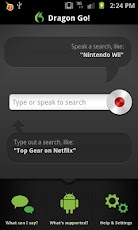
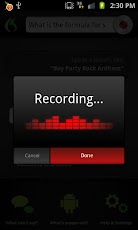
    dragonGoAndroid1 Nuance Dragon Go! voice control app lands in Android Market


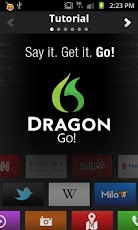
    Dragon Go! Just Say it, Get it and Go! Say goodbye to endless blue search links!
    Wouldn’t life be simpler if there were one app that you could simply tell it what you want – and it delivered it within seconds? Say ‘hello’ to Dragon Go!
    With Dragon Go! you can do more in less time like buy movie tickets as you walk into the theater, go shopping at local boutiques while you wait for your nails to dry, settle a bet at the breakfast table on the square root of Pi, or plan and invite guests to that night’s happy hour – all with just one ask of Dragon Go!
    Dragon Go! is finally the friend that truly ‘gets’ you – after all you know what you want, so why not spend more time enjoying the experience and less time searching for it? And only with Dragon Go! do you get direct access to 200+ of the most recognized destinations on the Mobile Web today spanning mobile entertainment and streaming media, social networking, shopping, and every other online content need imaginable simply by using your voice – such as Ask.com, YouTube, ESPN, LiveNation, OpenTable, Pandora ® internet radio and hundreds of others!
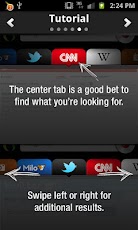
    What’s more, Dragon Go’s dynamic Dragon CarouselTM not only delivers you to the best site featuring what you want, it also delivers complementary results that enable you to slide the carousel from side-to-side to compare information across the most relevant sites for your Dragon Go! ask.
    For example:
    You say….
    “Show times for Girl With the Dragon Tattoo” – Dragon Go! delivers you directly to Fandango.com featuring showtimes for your local theaters. The Dragon CarouselTM also enables you to compare results on IMDB, Twitter, and Rotten Tomatoes to get you all the need-to-know information for that movie!

    Or say, ‘What are the planes flying overhead?’ and get up-to-the-minute information from Wolfram|Alpha on all the flights currently crossing over your location.


    You can also easily share your find with whoever you want via Skype, Twitter, Facebook, Gmail, and many more! And that’s not all! In a place where it’s not convenient to speak? You can also type your Dragon Go! request for the same fast, accurate results! To watch Dragon Go! in action visit http://www.youtube.com/nuancemobilechannel.
    Dragon Go! Say it. Get it. Go!
    Please note, for optimal performance we recommend and support Dragon Go! for Android OS v 2.1 through 2.3.7 using the native Android Media Player. Support for Android 4.0+ is on it’s way! For the most current list of supported devices, as well as additional information on how to use Dragon Go!, including tips and tricks, please visit: www.nuancemobilelife.com.


    source : market.android.com
    Continue reading →
    Friday, 13 January 2012

    Razorbee - Android based Smart TV Gadget

    0 comments


     RazorBee – Upgrade your TV to smart TV


    It’s really a good news for android lovers. Yet Another Android based HD Media player is available in the market under the low budget.
    The android based Razorbee is a smart TV upgrade for your existing TV, letting you do more than just browse through channel. Now flip through YouTube videos, check mails, read about your favorite topics, and connect on FaceBook – all on a format suited for TV. No more just viewing what is on TV – ‘Get what you want and when you want’, all by the push of a button.

    The Razorbee product consists of single unit handheld processor and a smart remote. The remote is one of its kinds with QWERTY keyboard and touch pad for the ease of access while browsing the net on your TV.


    The Razorbee has an Ethernet port for high speed LAN connectivity. Further you can also connect using USB dongles for Wi-Fi connection and select USB connections.
    Based on Android OS 2.2 and enhanced by in-house R&D

    Package Contents
    1. RazorBee Device
    2. Remote Controller
    3. Power Adapter
    4. AV Cable
    5. Ethernet Cable
    6. Two AA size batteries for Remote
    7. User Manual
    Hardware
    Cortex A8 processor with 256MB RAM Internal Storage 2GB
    Power adapter: Input 100-240VAC, Output 5V-3.5A
    Size
    RazorBee:
    Length = 124 mm
    Depth = 92 mm
    Height = 24.5 mm
    Remote:
    Length = 170 mm
    Width = 70 mm
    Height = 19.8 mm
    Display
    AV Interface for TV/Projector
    VGA Interface: Resolution 640x480 and 1024x768
    Connectivity
    Ethernet 10/100 Base-TX
    Wifi supported through USB dongle (Models Supported: Dlink - Dwa125, Dwl- G 122, DWA-131, Linksys - WUSB54GC)

    Mobile data cards are not recommended. However, RazorBee supports Reliance: Huwaei EC1262, ZTE AC2726 and Tata Indicom: Photon Plus EC1260
    Audio Interfaces
    Mic in: 3.5mm stereo mic for audio recording (PC Type)
    Headphone Out: 3.5mm stereo headphones out (PC type).
    Remote Controller
    Navigation: Touchpad + 10 keys
    Text Entry: Full qwerty keypad
    4 shortcuts keys

    Power save mode (wake up on any key press)
    Trackball & mouse mode (toggle by pressing blue key)
    Operated by 2 AA size alkaline cells.
    Network Options
    DHCP, Static IP, PPPoE
    Support for HTTP Proxy
    HTTP, HTTPs, Streaming
    External Interfaces
    Two USB 2.0 slots (Supported accessories USB pen drive, Data Card, Wifi Dongle, USB keyboard & mouse, not part of standard accessories)
    SD card slot
    Infra Red(IR) receiver for Remote
    LED indicatiors:Power, Internet activity, alerts
    Models Supported
    INTERNET WI-FI DONGLE
    INTERNET DATACARDS
    Make
    Model
    Make
    Model
    Dlink
    Dwa125
    Reliance
    Huwei EC1262
    Dlink
    Dwl- g 122
    Reliance
    Zte AC2726
    Linksys
    Wusb54gc
    Tataindicom
    Photon plus EC1260
    Multimedia Formats
    Web Contents: Android Browser
    Audio: MP3, AAC, AMR, 3GP
    Video: MP4, H.263, H.264 (380p quality) Limited video format support
    Image: JPG, PNG, GIF


    You can place the order in below Razorbee website with the price of Rs.3499

    http://razorbee.sindbad.co.in/product/razorbee

    Razorbee Best Price in India Rs.3500


    HomeShop18.com Discount Price Rs.3000/-


    Continue reading →
    Thursday, 12 January 2012

    How to Calibrate Android Mobile Phone Battery

    0 comments


    How to Calibrate Android Mobile Phone Battery


    The mobile phones are powered by rechargeable batteries included in the mobile phone itself. Most of the mobile phones provide 1 to 3 days of battery life and it depends on what kind of material with which battery is made up of. The Android operating system powered by Google eats up the battery a lot more than any other operating system because in Android there is continuous synchronization of data. If you get more than 24 hours of battery life on your phone then it’s phenomenal.
    For those who love to change the ROMs on their phone often, you would be obsessed calibrating your phone’s battery very often. For those who have flashed their mobile handset with custom ROM, they are advised to charge their mobile phone to 100 % battery and then update the firmware. Suppose of if update the firmware if you have 50 % battery life, then the new custom ROM will consider you 50 % battery life as the full battery stats and thus it would provide you half the battery as specified by your phone manufacturer. In such cases the battery calibration is required to gain 100 % battery backup as specified and let us go through some of the basic calibration process.

    Android Phone Battery Calibration

    Before proceeding to the battery calibration steps you should have Clock Work Recovery installed on your phone and you must be aware on how to get into recovery mode of your phone. For most of the Samsung mobile phone the recovery mode can be accessed by holding the volume UP button, OK button and then holding both simultaneously you need to press the power button until you see the blue screen background on your phone. The video here would be explaining you how to get your phone in recovery mode. For most of HTC handsets you need to hold the volume down button and then press power button.


    Here is the procedure to Calibrate your phone Battery -
    • First, you should power off your mobile phone and pull the battery and then re-insert it.
    • Now you should know how to get your mobile phone in recovery mode.
    • Now you need to go to Advanced option where in you would be navigating using the volume up and volume down button and using the power button you would be selecting the option. In the Advanced option would be selecting the ‘Battery Stats’ and then you would have to select “Wipe Cache”. Now that would wipe out the what is taken as 100 % during the custom ROM installation.Recovery Mode
    Now to determine the 100 % specified battery life of your phone, it can be achieved in three ways basically –
    The Battery Drain Way –
    • Drain your phone battery until its fully dead or till it switches off automatically.
    • Now charge your phone normally to the full battery.
    • You must have Clock Work Recovery app installed on your phone, you should reboot to clock work recovery and then wipe the battery stats found under the “Advanced” option and then reboot the phone.Clock Work Recovery Mode
    • Now you should look out the ways to quickly drain out your battery now. So better turn on Bluetooth, Wi-Fi hotspot, Wi-Fi, flashlight, camera to make your battery again dead.
    • Now charge your phone normally to the full and you are ready to get extra battery life added to your phone.
    Power OFF Charge Method –
    • In the Power OFF method you would be charging your phone to 100 % when it’s ON.
    • Unplug the charger from the phone, Power off your phone and then charge it up to 100 % again when it’s on power OFF state.
    • Now again unplug the charger from phone. Power it ON and then charge it again to 100 % while the phone is ON.
    • Unplug the charger and then reboot the phone using the Clock Work Recovery.
    • In Clock Work Recovery options, go to Advanced and then select the clear battery stats options.
    • Power ON and charge the mobile to full, enjoy.
    ON /OFF Way
    • When your phone is powered ON, charge the battery until the LED turns BLUE.
    • Unplug the phone from the charger and wait till the LED turns OFF.
    • Now power OFF your phone.
    • When the phone is OFF, plug the charger into the phone and charge it up until the LED turns Blue.
    • Still the phone is OFF and unplug the charger, wait until the LED turns OFF.
    • Now Power ON the phone.
    • Wait until the phone is booted completely and then power OFF the phone again.
    • When the phone is OFF again plug the adapter into your phone and charge it up until the LED turns blue.
    • Now boot your phone in recovery mode and once you see the blue screen, navigate to Advanced option using the volume up and down keys and then choose the option ‘Wipe Battery Stats’.
    • Now Power OFF your phone and use it normally.
    Do let us know if you come across any issues during the battery calibration steps and we would try to resolve those issues. You can make use of comment section below to communicate with us and explain your issues clearly.

    Source: http://androidadvices.com

    Continue reading →